
One hive of AI modules,
built for every kind
of work.
SeerHive brings focused AI modules together in one place. Use them to rank resumes, write job descriptions, prepare interview questions, build resume templates, send reminder calls with IVR Outbound and answer callers with the AI Voice Agent. You can use one module on its own, or connect them all through SeerHive to manage people, clients, timesheets and invoicing in the same system.
An AI agent that answers your calls, from your own knowledge.
Callers speak in their own words and get answers from the documents you upload. When someone needs a person, it takes their details and sends your team a callback request. It also runs outbound campaigns from a contact list.
- Natural voice
- Answers from your documents
- Inbound and outbound
- Hands off to your team
- English and Indian languages
A hiring and workforce platform, made of small, focused tools.
SeerHive helps a team find people, hire them and manage them afterwards. It has these products: five AI modules for resumes, job descriptions and interview questions, IVR Outbound for personalised reminder calls, an AI Voice Agent that answers and makes calls from your own documents, an Ingestion Dashboard that shows where every resume went, and the SeerHive HRMS that keeps every candidate, client, timesheet and invoice in one record.
You do not have to adopt everything. Use one tool on its own, and connect the others when you need them.
See the products →Built for everyone in the hiring process.
Staffing and recruitment agencies
Hire for several clients, track contract and permanent placements apart, and invoice each client.
Company HR teams
Hire for your own company, issue offers, onboard people and run payroll in one place.
Recruiters
Score resumes, write job descriptions, prepare interview questions, and call candidates with reminders and answers.
Finance teams
Raise invoices with GST worked out, follow payments and process monthly payroll.
Managers
Approve timesheets and see hours, utilisation and leave for the people who report to you.
Employees
Log time, apply for leave, and check your own attendance and payslips.
Each product does one job.
Resume screening, job descriptions, interview questions, resume templates, resume enhancement, reminder calls and spoken answers for callers each have their own tool. The HRMS tracks the candidates, clients and billing around them. All of it is part of SeerHive. Hover over or tap a product to see its screen.
Resume Enhancer
Fit a resume to a job description without adding anything false.
Upload a resume and a job description to get an improved version of the resume. You see the match score before and after, and each change is explained.
View details ↗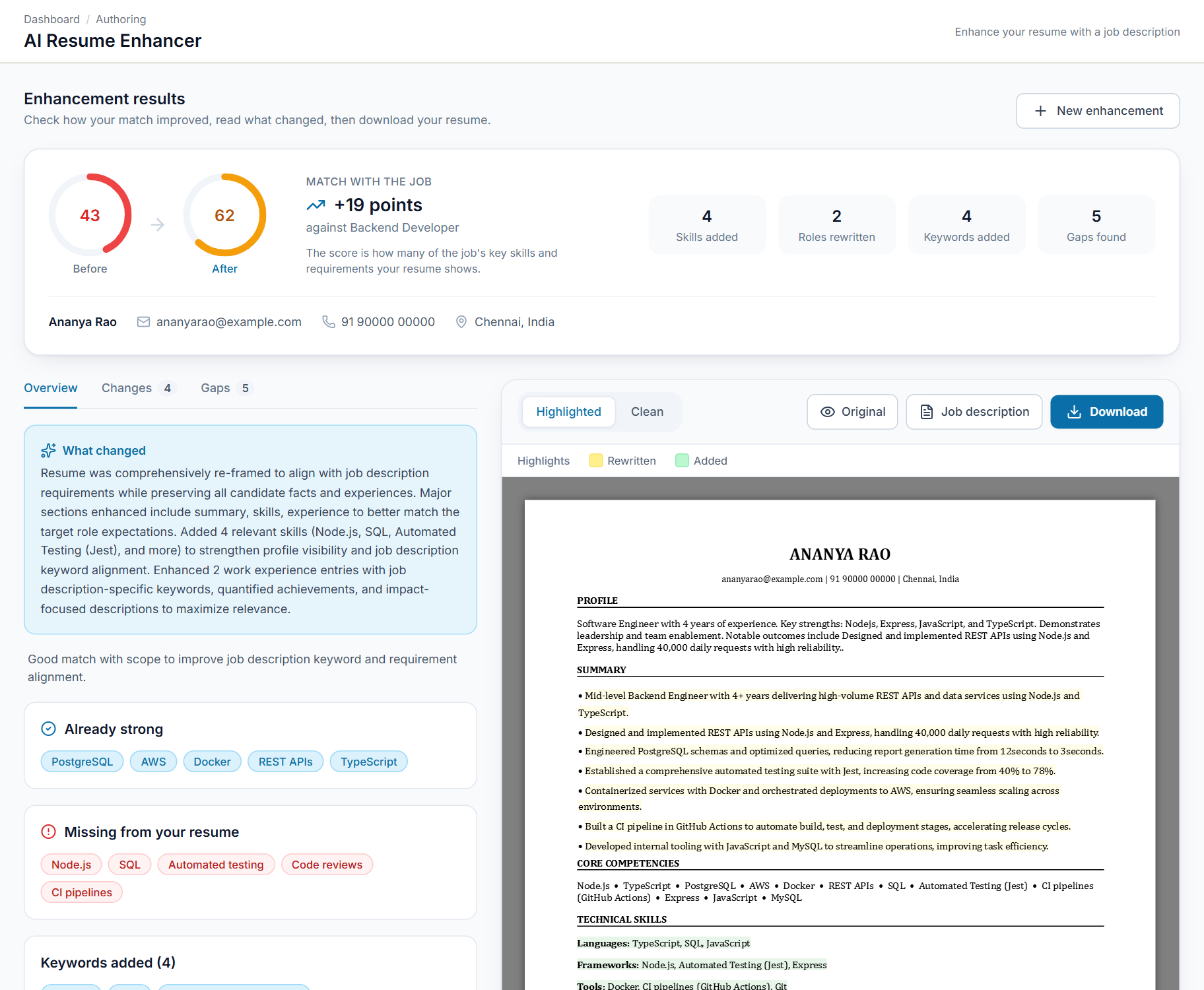
IVR Outbound
Personalised reminder calls, timed to each person, answered with one key press.
Build a call flow once, then call every contact in a natural voice with their own name, date and time. Missed calls are retried, Do-Not-Call numbers are skipped, and every keypad response is saved.
View details ↗AI Voice Agent
An AI agent that answers and makes your business calls, from your own knowledge.
It picks up inbound calls, holds a natural conversation, and answers from the documents you upload. When a caller needs a person, it takes their details and sends a callback request to your team.
View details ↗Ingestion Dashboard
See every resume. Fix every failure.
The operator dashboard that shows where every resume went and what to do when one gets stuck, in plain language, without reading a log.
View details ↗SeerHive
Core systemThe HRMS that connects hiring, clients and billing.
Track candidates from selection to onboarding, manage clients and jobs, schedule interviews, and take each hire through timesheets and invoicing, all in one system.
View details ↗Resume Analyser
Rank resumes against a job description, using the criteria you set.
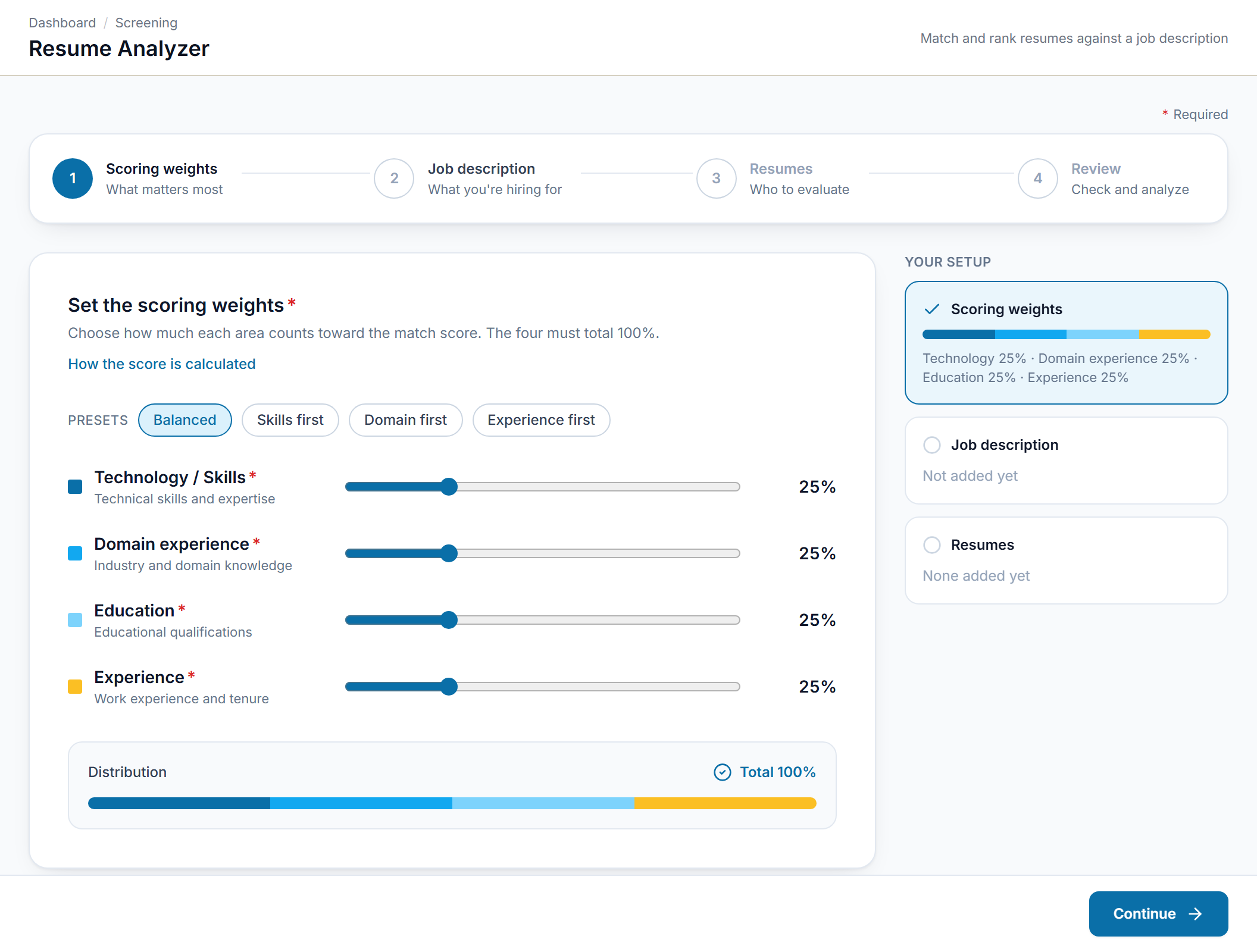
Decide how much skills, domain experience, education and experience should count. Then add a job description and a batch of resumes, and every candidate is scored against the role.
View details ↗Resume Template Builder
A professionally formatted resume template in a few steps.
Start from a profile or a job description, choose the experience level, target role and layout, and generate a suitable resume template.
View details ↗Interview Question Generator
Interview questions made for the role or the candidate.
Generate a set of questions from a job description or from a candidate's resume. Choose the types (coding, theoretical or scenario-based) and how many questions you need.
View details ↗JD Generator
Turn rough notes into a well-structured job description.
Describe the role in your own words, or upload a file, and get a complete job description that you can edit line by line and download.
View details ↗Resume Enhancer
Fit a resume to a job description without adding anything false.
What Resume Enhancer covers
Match score before and after
See how well the resume fits the job description, and how much the match improved after enhancement.
Every change explained
Every change is explained section by section, so you always know what was edited and why.
Highlighted and clean versions
Download a Word file with rewritten text highlighted in yellow and new text in green, or a clean copy that is ready to send. Both come in a single-column or two-column layout.
Facts stay yours
It only rewords and reorders what is already in the resume. It does not add experience or skills.
Common file formats
Upload the resume as a PDF, DOCX or TXT file of up to 10 MB.
Tailored to the job
Paste or upload the job description that the resume should be matched to.
Focused tools. One job each.
Each module takes care of one part of the hiring process. These are the actual screens. Open any module to see what it covers.
Resume Enhancer
Fit a resume to a job description without adding anything false.
Upload a resume and a job description to get an improved version of the resume. You see the match score before and after, and each change is explained.
- Match score before and after. See how well the resume fits the job description, and how much the match improved after enhancement.
- Every change explained. Every change is explained section by section, so you always know what was edited and why.
- Highlighted and clean versions. Download a Word file with rewritten text highlighted in yellow and new text in green, or a clean copy that is ready to send. Both come in a single-column or two-column layout.
IVR Outbound
Personalised reminder calls, timed to each person, answered with one key press.
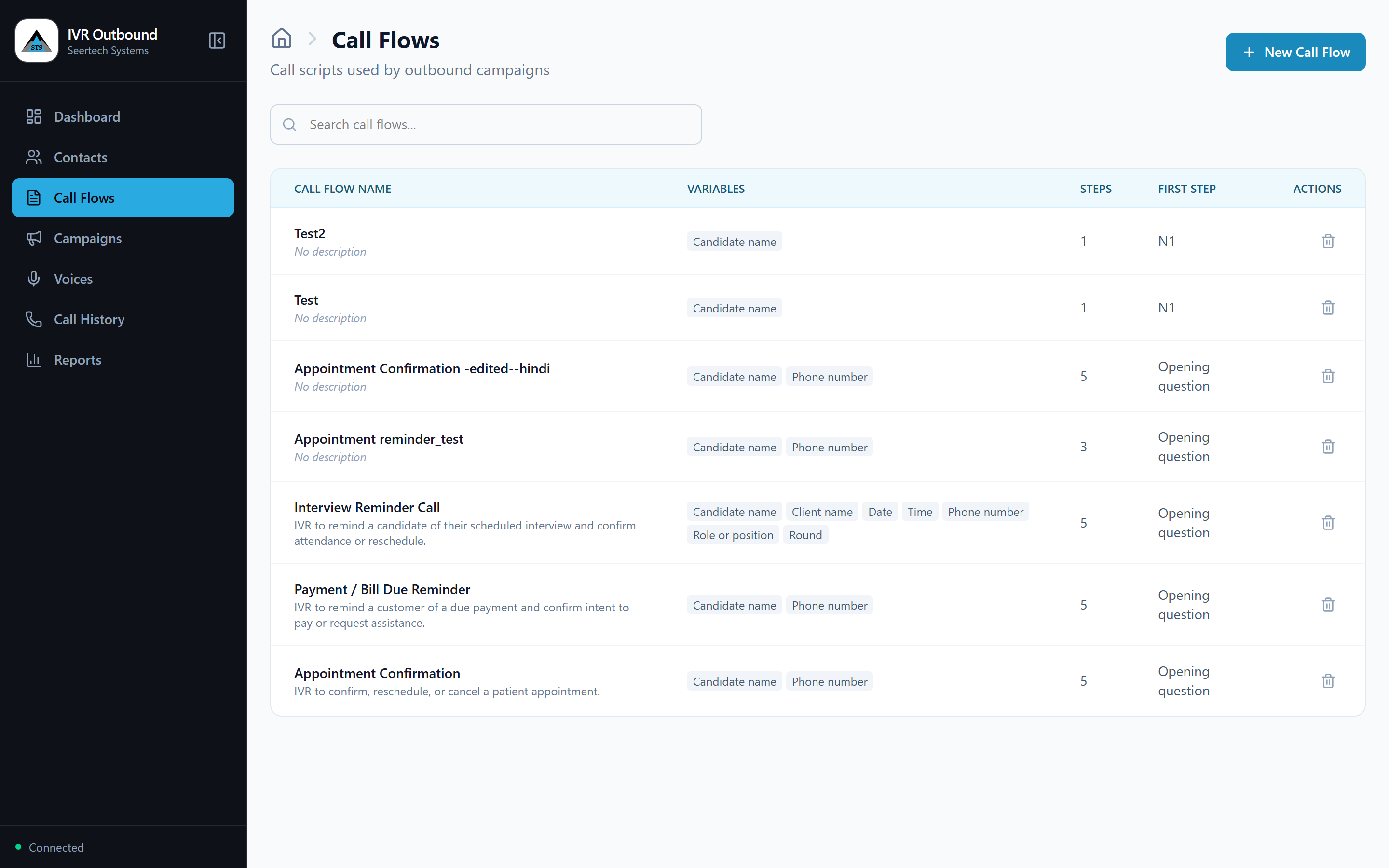
Build a call flow once, then call every contact in a natural voice with their own name, date and time. Missed calls are retried, Do-Not-Call numbers are skipped, and every keypad response is saved.
- Visual call-flow builder. Design "Press 1 / Press 2" flows on screen with no coding. The builder flags mistakes before a single call goes out.
- Personalised at scale. Every call uses the person's own name, role, date, time or amount, and dates and times are spoken the way a person would say them.
- Smart scheduling. Call everyone now, at a fixed time, or a set number of minutes before each person's own appointment, in the right time zone.
Agent
On Saturdays the OPD is open from 9 in the morning to 1 in the afternoon.
Sample data
AI Voice Agent
An AI agent that answers and makes your business calls, from your own knowledge.
It picks up inbound calls, holds a natural conversation, and answers from the documents you upload. When a caller needs a person, it takes their details and sends a callback request to your team.
- Natural voice conversations. Callers speak normally and can interrupt mid-sentence, as they would with a person. There are no menus to navigate.
- Answers from your knowledge. Upload documents, web pages or notes. The agent answers from that content, so answers stay consistent with your policies.
- Inbound call handling. Assign a business phone number to an agent and it picks up every call, day or night.
Ingestion Dashboard
See every resume. Fix every failure.
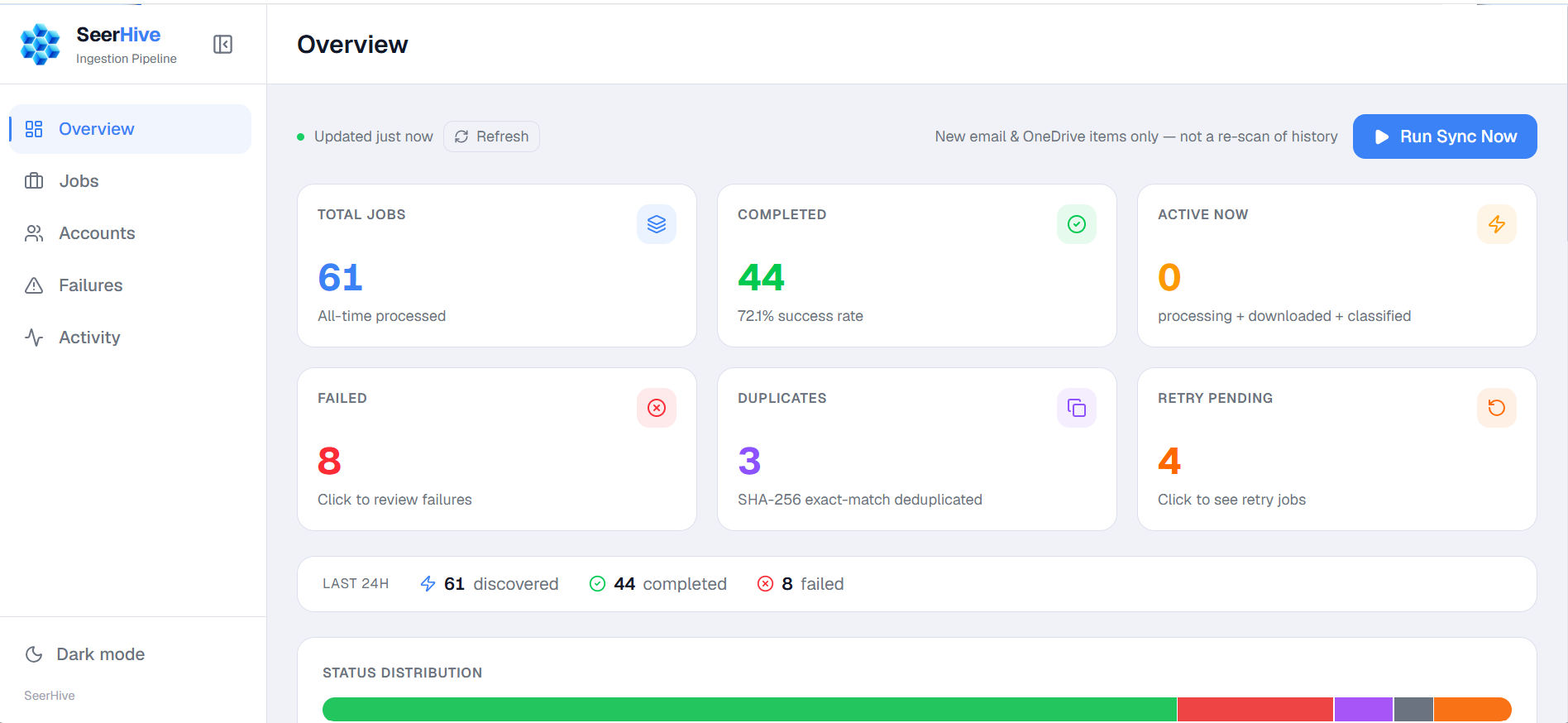
The operator dashboard that shows where every resume went and what to do when one gets stuck, in plain language, without reading a log.
- Pipeline health at a glance. Total, completed, failed, duplicate, non-resume and in-flight counts, an ingestion-volume chart for the range you pick, and a recent-activity feed. It refreshes every 30 seconds.
- Follow any resume end to end. Search the whole dataset on the server by file name or job ID, not just the page you happen to be on. Filter by status, account, source, error stage and date range.
- A timeline for every job. Open a job to see a stage-by-stage timeline, its outcome, the error explanation and where it came from. Share a link such as /jobs?job=<id> to hand a colleague the exact record.
Resume Analyser
Rank resumes against a job description, using the criteria you set.
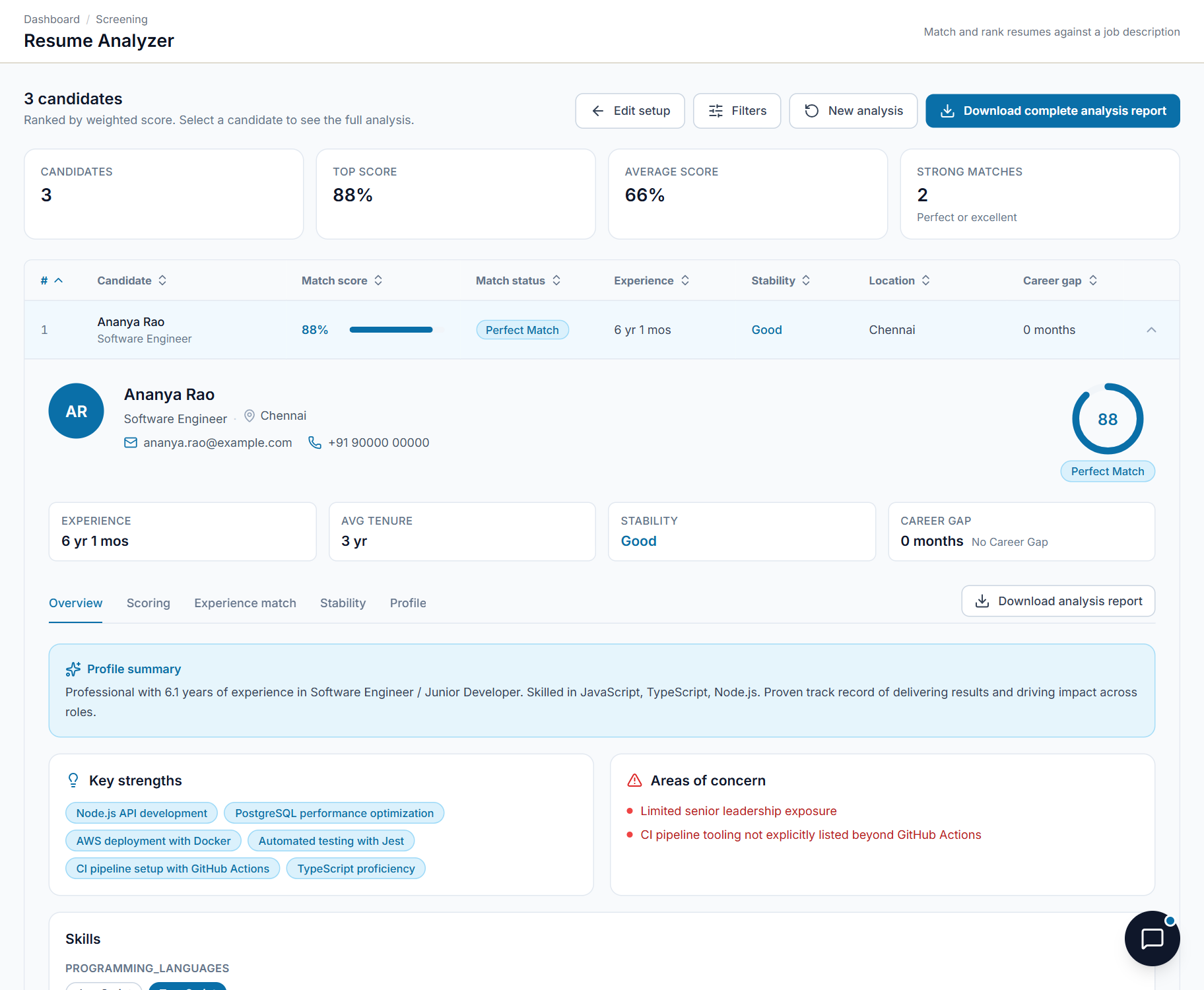
Decide how much skills, domain experience, education and experience should count. Then add a job description and a batch of resumes, and every candidate is scored against the role.
- Technology and skills. How closely the candidate's technical skills match what the role requires.
- Domain experience. Industry and domain knowledge that is relevant to the role.
- Education. Educational qualifications compared with the requirement.
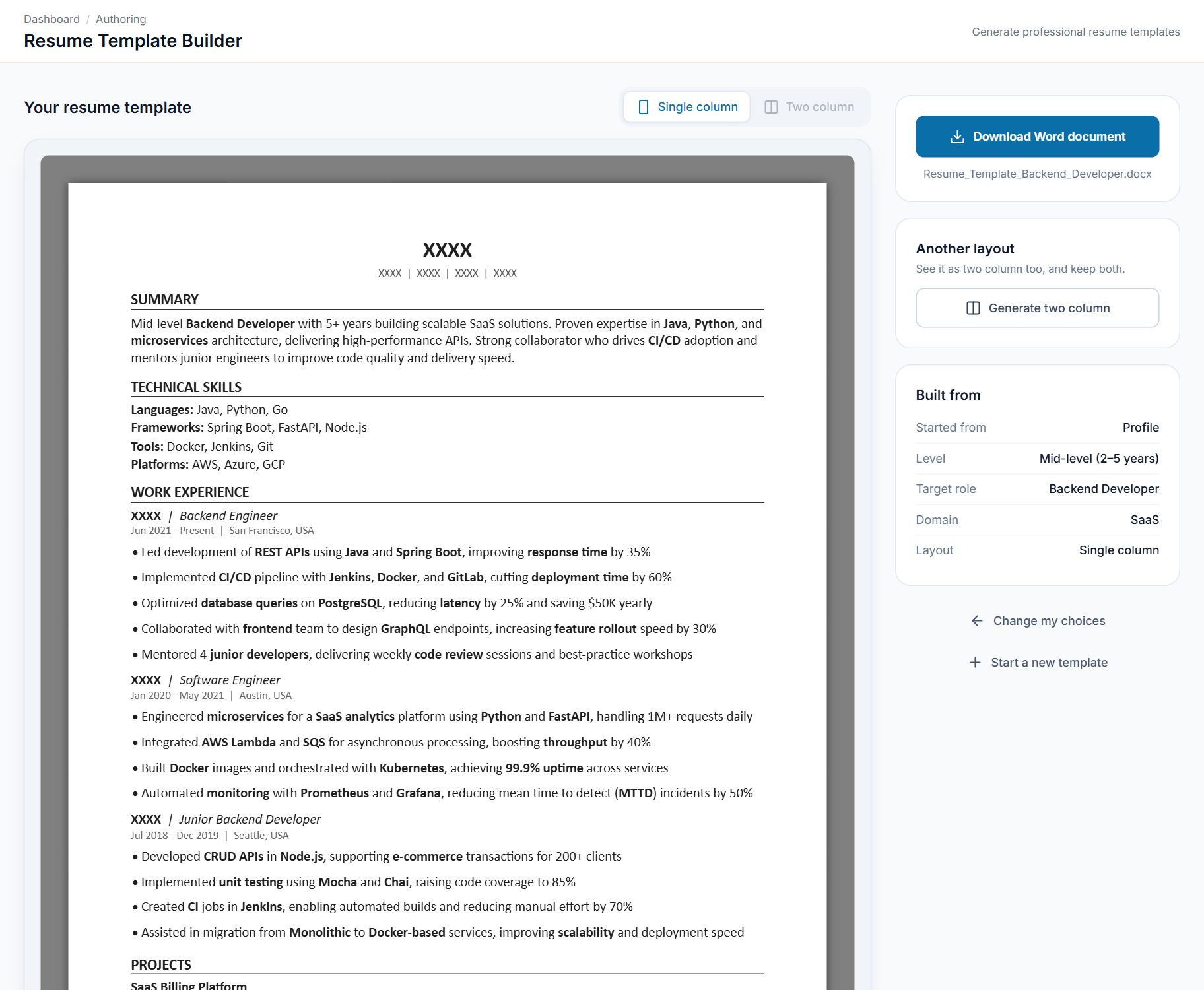
Resume Template Builder
A professionally formatted resume template in a few steps.
Start from a profile or a job description, choose the experience level, target role and layout, and generate a suitable resume template.
- Start from a profile. Tell us about your experience and the kind of role you want. You can also add a target role and domain.
- Start from a job description. Paste or upload a job description so that the template suits that job.
- Experience levels. Fresher, Mid-level, Senior, Lead, Manager and Executive. The level decides what the template shows first.
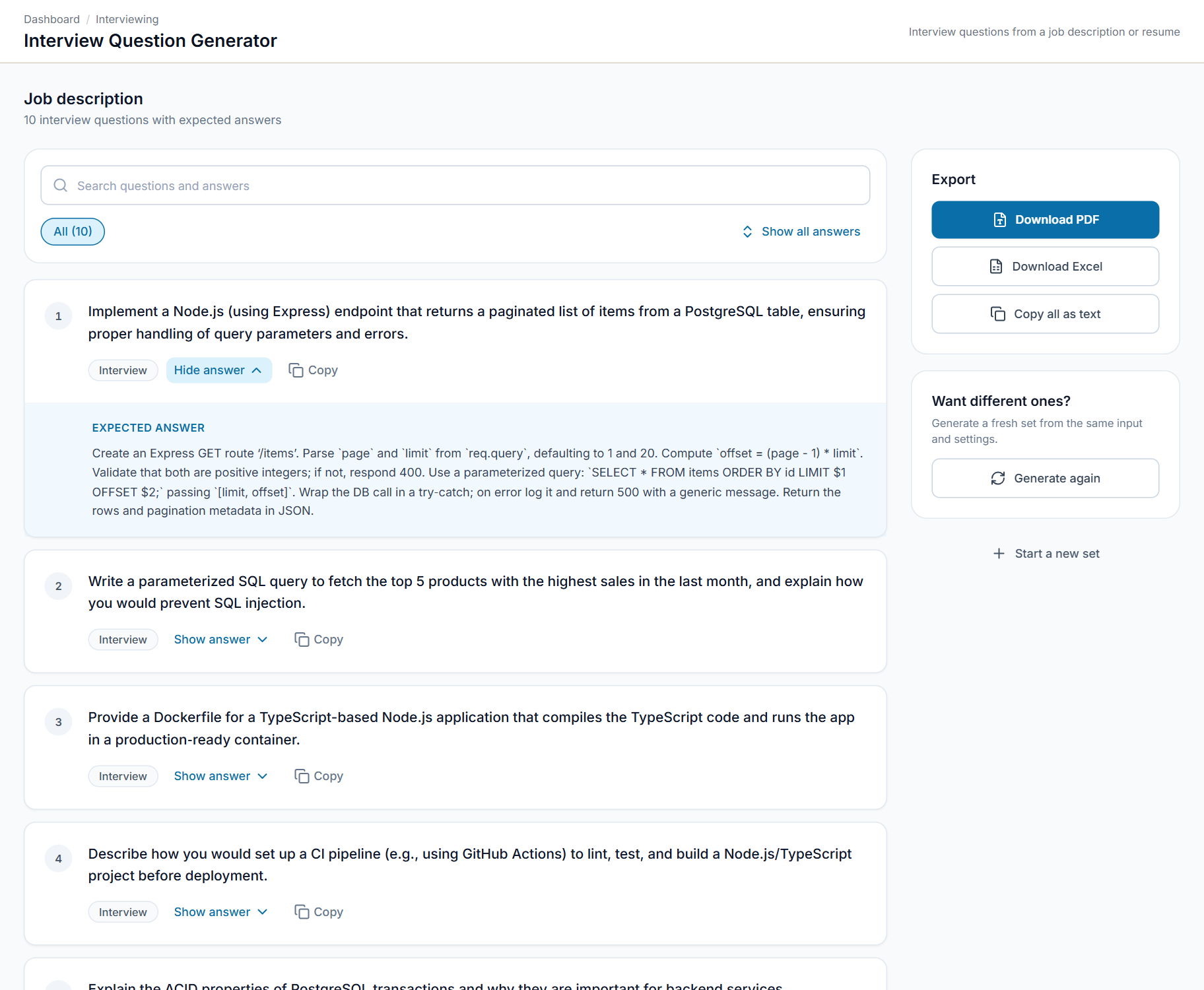
Interview Question Generator
Interview questions made for the role or the candidate.
Generate a set of questions from a job description or from a candidate's resume. Choose the types (coding, theoretical or scenario-based) and how many questions you need.
- For a role. Questions built from a job description, which test what the job needs.
- For a candidate. Questions built from a resume, which explore that person's background.
- Question types. Coding, theoretical and scenario-based. Choose any combination.
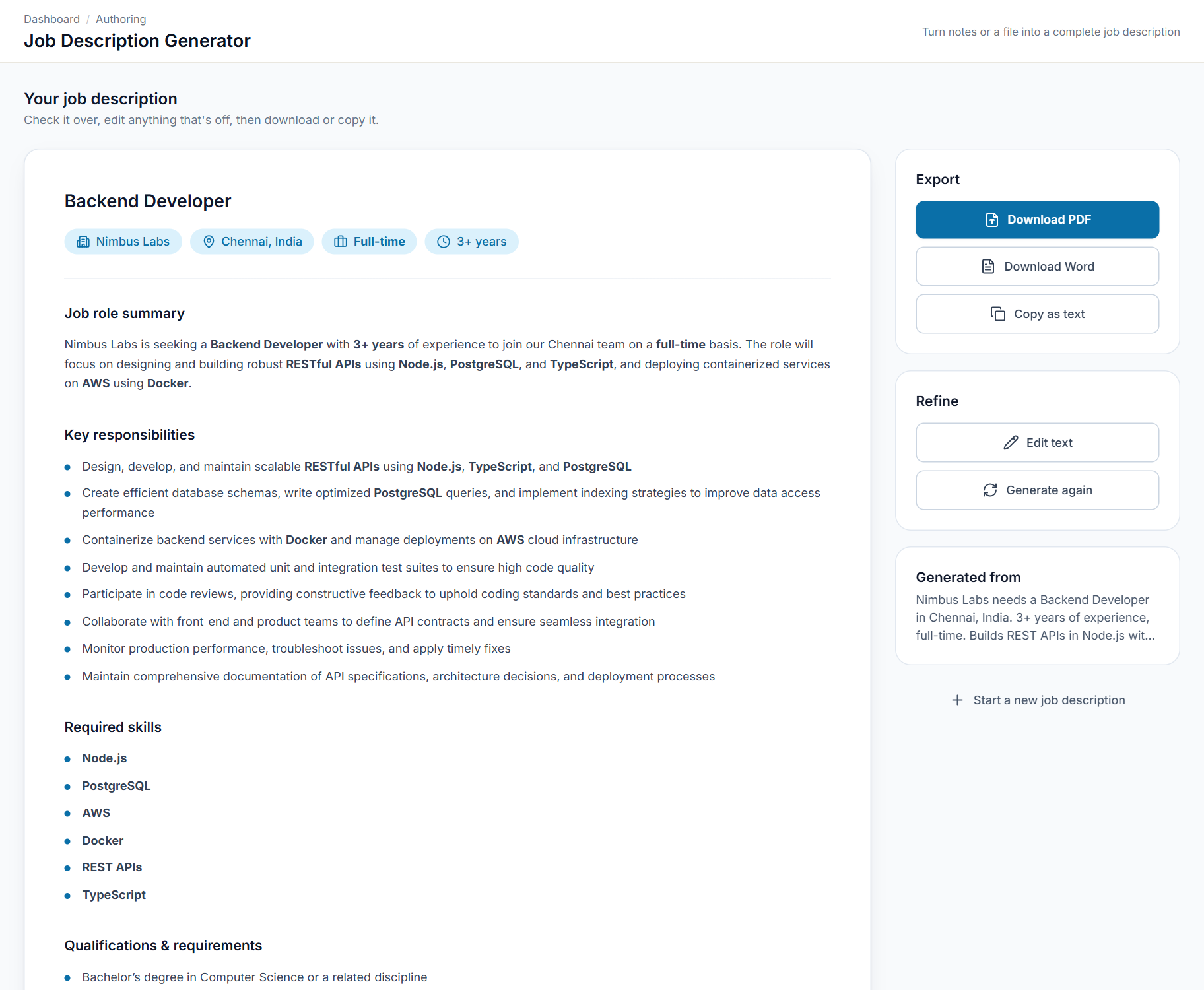
JD Generator
Turn rough notes into a well-structured job description.
Describe the role in your own words, or upload a file, and get a complete job description that you can edit line by line and download.
- Paste notes or upload a file. Write about the role in your own words, or upload your notes as a TXT, DOCX or PDF file.
- Structured output. The role, company, location, experience and employment type, followed by a summary, responsibilities, skills and qualifications.
- Edit any line. Review the draft and change any line before you use it.
One job description. One shortlist. One hire.
Most tools start at the resume, but the work starts earlier and ends later. Follow a single vacancy through the products, from the first line of the description to the first invoice.
- 01 · Write the roleJD Generator
Rough notes become a structured job description with a summary, responsibilities, skills and qualifications. Edit any line, then download it.
- 02 · Screen the resumesResume Analyser
Every resume is scored against that same description with the weights you set, and each ranking comes with the reasons for and against.
- 03 · Confirm the interviewIVR Outbound
Scheduled interviews come in from SeerHive ATS and each candidate gets a reminder call before their own slot, pressing 1 to confirm or 2 to reschedule.
- 04 · Prepare the panelInterview Questions
Coding, theoretical and scenario questions with an expected answer for each, built from the job description or from the candidate's resume.
- 05 · Answer candidatesAI Voice Agent
Candidates ask about the role, the process and the documents they need, and get answers from your own material. Anything it cannot answer becomes a callback request.
- 06 · Hire and manageSeerHive
The candidate moves from offer to onboarding, then into timesheets, payroll and client invoicing, all on one record.
And for the candidate: Resume Template Builder shapes a resume to the role and level, and Resume Enhancer tailors an existing one to the job description, showing the match score before and after.
One system for every hire,
from selection to onboarding.
SeerHive is the HRMS behind the platform. It is made for companies that hire for themselves and for staffing partners that place candidates with clients. Dashboards show where every hire stands.
Candidate pipeline
Follow each candidate from selection to offer, acceptance and onboarding. Declined offers, rejections and drop-offs stay visible.
Clients and jobs
Manage client accounts and open jobs together, whether you hire for your own company or place candidates with clients.
Interviews and recruitment
Schedule and follow interviews, and keep recruiter activity next to the pipeline it belongs to.
From hiring to invoicing
Record and approve timesheets, then raise client invoices in the same system that tracked the hire.
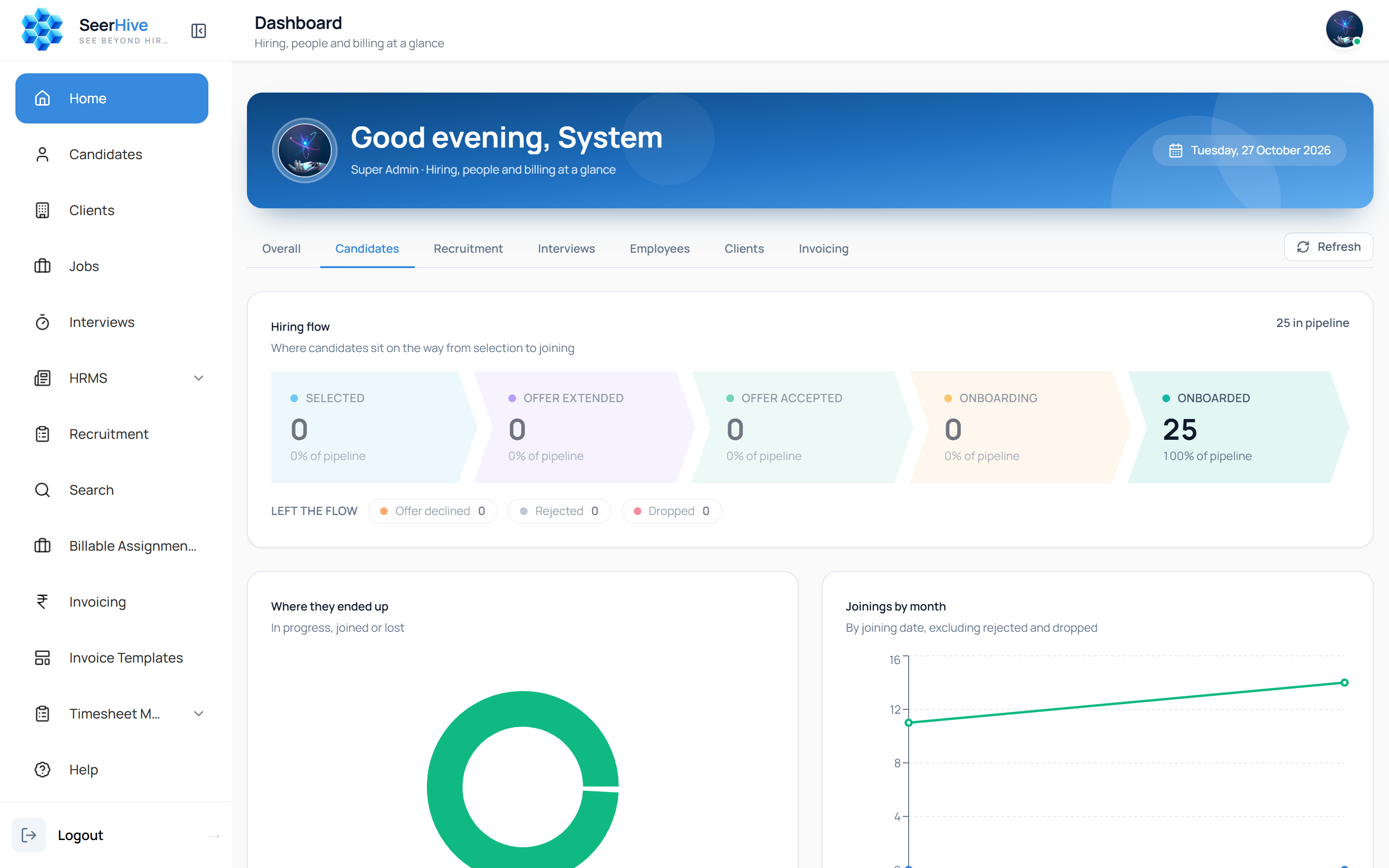
Every product, one look.
These are the real screens of our products. Choose one to bring it to the front and see what it does.
Resume Enhancer
Fit a resume to a job description without adding anything false.
One platform, three kinds of users.
Find, screen and follow candidates faster
Score resumes against a job description, write the description itself, prepare interview questions, and call candidates with reminders, all before the interview starts.
- Resume scoring
- Job descriptions
- Interview questions
- Automated calls
SeerHive next to the usual ways of working
Most teams use several separate tools or a set of spreadsheets. This is how that compares.
| What you need | SeerHive | Separate tools | Spreadsheets |
|---|---|---|---|
| Resume scoring, job descriptions and interview questions | Built in | Different tools | Manual |
| One candidate record from selection to payroll | Yes | Copied between tools | Copied by hand |
| Offer letters made from the record | Yes | Sometimes | Written by hand |
| Timesheets approved before payroll and invoices | Yes | Separate system | Manual checks |
| Contract and permanent placements tracked apart | Yes | Varies | Extra sheets |
| Start with one tool and add more later | Yes | Yes | Not applicable |
Simple tools that fit the way you hire.
Start with one module, or use them all together. You stay in control of the result.
Use one or all
Every module works on its own. Start with the task that slows your team down the most, and connect the others through SeerHive when you are ready.
You set the criteria
Resumes are ranked against your job description using the weights you choose, so the ranking reflects how your team actually hires.
Nothing invented
Enhanced resumes and generated descriptions stay true to what you give them. Nothing is added that is not already there.
Not sure where to start?
Have a question about a module? We read every message.
Frequently asked questions
How do the AI modules, IVR Outbound, the AI Voice Agent and SeerHive fit together?+
SeerHive is the HRMS. It tracks candidates, clients, jobs, interviews, timesheets and invoicing. The AI modules (Resume Enhancer, Resume Analyser, Resume Template Builder, Interview Question Generator and JD Generator), IVR Outbound and the AI Voice Agent each handle one task in the hiring process. You can use them on their own or together with SeerHive.
Can a staffing agency use SeerHive for multiple clients?+
Yes. SeerHive manages client companies and their jobs along with the roles you hire for directly. It also tracks contract and permanent placements separately.
Can I use the AI modules without SeerHive?+
Yes. Each module works on its own. You can score resumes, generate job descriptions, prepare interview questions, build resume templates or enhance resumes without SeerHive. SeerHive is where a candidate is tracked once they enter your pipeline.
What does IVR Outbound do?+
It makes personalised outbound calls from a call flow you build once, such as interview reminders, appointment confirmations or payment reminders. Each call can go out immediately, at a fixed time, or a set number of minutes before that person's own appointment. Unanswered calls are retried, Do-Not-Call numbers are skipped, and the key each contact pressed is saved. You can download the results of a campaign as a spreadsheet.
What does the AI Voice Agent do, and how is it different from IVR Outbound?+
IVR Outbound plays your message and records a key press, which suits a fixed confirmation. The AI Voice Agent holds a spoken conversation: it answers inbound calls, answers questions from the documents you upload, runs outbound campaigns, and passes the caller to your team as a callback request when it cannot help. Every call is logged with a transcript and a summary.
Will the AI Voice Agent make things up?+
It is designed to answer from the documents you provide and to stop guessing when it cannot find an answer. In that case, or when the caller asks for a person, it collects their details and sends your team a callback request with the conversation. You also set the topics it may discuss, and it keeps personal data such as phone and card numbers out of its spoken replies.
What is the Ingestion Dashboard?+
It is the operator console for the SeerHive resume ingestion pipeline, which collects resumes from email mailboxes and OneDrive, removes duplicates, checks and classifies them, and stores them. The dashboard shows whether resumes are flowing, where any single file ended up, and what to do when something fails, in plain language. It does not process resumes itself and does not edit candidate records.
What products does SeerHive offer?+
SeerHive offers an HRMS, a set of AI modules, IVR Outbound, the AI Voice Agent and the Ingestion Dashboard. Each product has its own page with a list of features.
Can I see it live?+
Yes. Contact the team to arrange a walkthrough using your own resumes and job descriptions, either online or on-site.
How much does it cost?+
Pricing depends on which products you use and how many people use them. Contact the team and we will send you a quote.
Can I move my existing data into SeerHive?+
Yes. Past candidates, clients, employees and invoices can be imported from spreadsheets. Tell us what you have and we will explain how it is loaded.
Who can see an employee's salary and attendance?+
Access depends on role. Employees see their own timesheets, leave, attendance and payslips. HR and finance see company-wide records, and managers see their direct reports.